Category: IT
-
Backup & Recovery Tips
My new notebook hard disk was giving me problem. Imagine every 10 minutes, the CPU will be heavily utilized and everything freezes for a minute. My IT tech support team asked me to do a self diagnosis on the hard disk. It failed! A few times, I get this error “cannot detect hard disk” when booting up.
Since the notebook is new, the IT support team will replace the hard disk for me. I didn’t like this because I need to spend time reinstalling all the applications again. It took me a whole day to do that when I switched over to the new notebook.
A friend told me that there is software that comes with the HP notebook that allows me to backup the data and applications as well. In order to do this efficiently, I moved all my data into an external hard drive. Then I start the backup process that includes all application, registry settings and left over data.
It took an hour to build the recovery image. If I didn’t move my 150G data over to my external hard drive, it will probably take a day. Moving data to my external hard disk was fast. After the replacement of my hard drive, I restored my image. It works beautifully and it took only an hour.
Instruction: Start -> Programs -> Accessories -> System Tools -> Backup. A wizard will appear, select Advance Mode. Then just follow the screen for selection. Remember to select “backup everything on this computer”
-
BM Vs English
The recent announcement where the govt wants to switch back the teaching of Science and Maths to BM or mother tongue puzzles me. If you look at today, most of the Science terms used are in English. The application of Science terms use in Chinese, Tamil or BM is very little.
Today we were discussing this in our office and one of my colleagues brought up a good point. He said when he heard the India IT outsource workers talk, they are speaking Hindi, Hindi, Hindi, CPU, Hindi, Hindi, Hindi server Hindi…. Some computer terms has weird meaning if it is translated to mother tongue.
Let’s take computer terms as computer is my field. Here is some of the translations I found and it really make laugh.
Mouse – Tetikus or Petunjuk
Click – Tekan
Double Click – Tekan-Tekan
Cut & Paste – Potong danGumLekat
Save – Kemas Kini
Enter – Masuk
Ink Jet – Pancutan Dakwat (hehehehehe….LOL)
Database – Pangkalan Data
Access Denied – Laluan DiHalang
Sound Card – Kad Bunyi
Motherboard – Papan Ibu
Monitor – Ketua Darjah??!! (someone suggested)
Keyboard – Papan Kunci
Local Bus – Bas Tempatan
Joystick – Batang Gembira (try translating plug and play!)
Sound Blaster = Peletup BunyiMaybe these terms are not the official ones but it sure sounds funny to me.
-
Gmail Locator
Now your gmail allowed you to detect your location of where you are. You have the option to turn in on or off. In order to activate it, you go to your gmail account. To activate the locator, you go to Settings -> Labs -> Location in Signature. Check Enable.
Before you activate the locator, you must enable your signature by clicking Settings -> General -> Signature. Add a nice sign off message like “Bye There!”. Check “Append your location to the signature”
After that, whenever you compose an email, you will find your location there. I tried but the location detected was way out! It said that I am in Kota Kinabalu and I am nowhere near there. Oh well, give Google sometime to get it right.
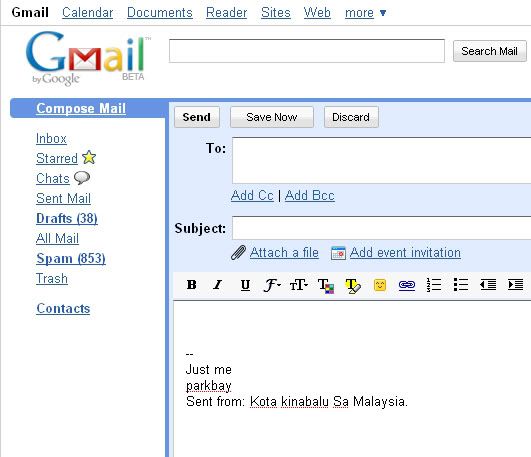
It will be very useful if it is used in the mobile. If you are lost, you can use it to detect your location. However the location now given is not accurate to the street. If it has the street, it will be good. If you want your privacy, just disable it.
By the way, there is no privacy of your location once you are online. Every PC/notebook/mobile will have a unique IP address. With IP address, the location is exposed whether you like it or not. If you don’t like it, stay offline.
-
Backup Your Blog
How many of you backup your own blog? Do you trust your server hosting company to do a good job? As I do not pay a significant amount of money for my host server, some of the things I have to do on my own. My host server management is actually doing a great job, they have proper backup process in place.
A word of warning to you, especially for those who are earning from PPP or whatever advertising program, backup your blog. You may not know when a hacker will strike or a server crash. It happens as hardware is not 100% reliable. If all your postings are gone, those unpaid sponsored post will be gone.
I am running my blog on a very old version. I kind of like the old version interface and got used to it for so many years. The new version sometimes gives me a headache. With this old version, there isn’t any export function. On top of that, it is an old version, so installation of the old version may not be available in the even I need a recovery.
Anyway, I found an excellent plugin (wp-xmlmigrate plugin) to export it to XML file from http://technosailor.com/wordpress-to-wordpress-import/ . For those running on WP 2.x and above, there should be an export function. You can export your entire blog to XML file and store it in your PC periodically. On top of that, I also backup my blog database. I believed the XML restoration will be faster than restoring the database.
I did a lot of searching before I found this plugin, there were many other plugins that I installed which didn’t work. One that I downloaded, mess up my entire blog. Imagine, my entire blog gone, yes a total blank page. If you were me, you will freak out. Fortunately I had backup and restore it. It works, phew. Backup is very important, so put some thoughts into it.
Oh, for those who do not know what I am saying because it is too technical, check with your hosting server company and ask them about their backup process. I think they can help you.
-
IRB Security Issue
IRB haunts me again. I have completed my e-filing, just one more button to click for submission. Then my colleague sends me this link: http://blog.limkitsiang.com/?p=132 . There seems to be a security flaw in the IRB e-filing system. Someone press the submit button and someone else records pop up. Now do I trust the “gomen” in protecting our P&C data? I better not say anything further, later they ask me to register myself.
Should I send in the physical form or press the submit button?
-
New Toys For The Parents – Apple iMAC

I can throw away the Microsoft OS PC and welcome Apple Macintosh. I find that Microsoft Windows XP is giving us a lot of problems especially it has a very poor security protection. Most of the time, there are a lot of background processes going on in the background draining the memory away.

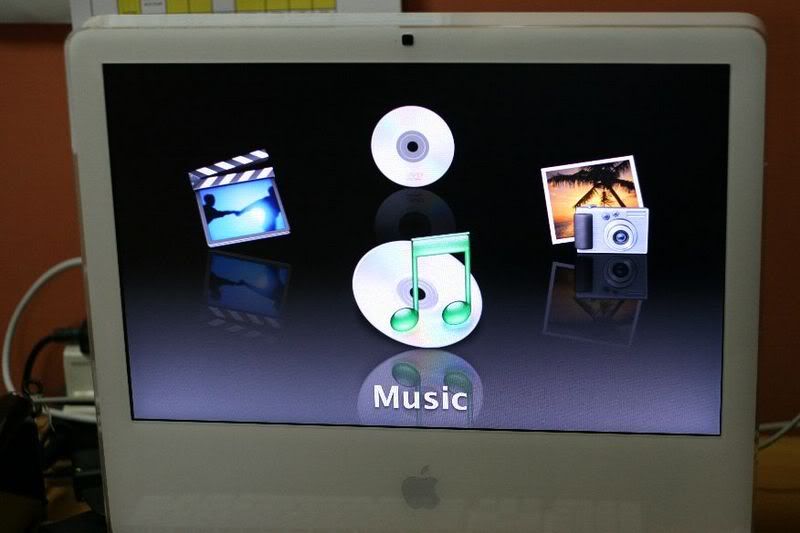
My hubby decided to get an iMAC since it has the best deal right now and endless benefit. It comes with a 20 inch monitor with iTune, iPhoto, iDVD, iMovie and iwhatever. Resolution is superb, good for watching video and photo rendering. The best thing with iMac, there is no CPU unit. What you see on the picture is all that is to it. iMac concealed all its working parts behind the gorgeous widescreen display. There is no sound at all when it is processing. Total silence!It came with a wireless keyboard, no messy wire on the table. In addition, we got free speakers which we are going to sell it off. We don’t need such big speakers. The internal speakers are good enough.
Why iMac? You probably need a new PC to run Microsoft Vista. You spend less time troubleshooting, all hardware and software just work. You can run dual OS, Mac and Microsoft Vista on the same machine using VMware. Major, major importance iMac has the highest security with less malicious attack. You don’t need to hunt for drivers every time you install a new gadget or hardware. Besides that, it is known that iMac produce the best resolution for movie. Lots of advertising company is using iMac for their work of art. Have I changed your mind yet?
My hubby and I were exploring the iMAC til 1am yesterday. *yawn*



-
Silly Spams
I don’t really understand some silly people who create spams. I know some spams have some sort of benefit to the spammers like using your blog to advertise their links or educate you on their product or services information. However I received many of these spams below:
New comment on your post #433 “Emopoetry”
Author : bsevfo drocy (IP: 221.178.36.188 , 221.178.36.188)
E-mail : zrwl@mail.com
URI : http://www.ytvmu.nvbfd.com
Whois : http://ws.arin.net/cgi-bin/whois.pl?queryinput=221.178.36.188
Comment:
ahnue czgoasnhy okjsp goxscrt hfil uqbkzas sqhgajlThe URI and email are not valid and the comments are gibberish. What are they trying to do or advertise, what benefit do they gain by creating this spam? Are they loving me so much to give me high traffic? Maybe they are trying to bring down my hosting server by creating massive traffic. I wonder how many of these spams can really bring down the server. It is so delinquent. If you want to spam, please spam wisely. Don’t get me wrong, I am not encouraging spams but telling these spammers that they are below silly.
-
Best Workplace in US – Google
I received this a few days ago in my mail box. Wow, Google voted the best place for employee to work for in US by Fortune 5000. You have to see it to believe it. Google workplace is like a vacation home for employees. It is like a new generations or new age workplace. As long as Google is making a huge profit and successful, they can naturally do whatever they like. They claimed that the Google workplace builds employees loyalty, motivation, creativity and drive performance. See for yourself and support your jaw.
-
MAS – Mana Ada System
I don’t mean to down grade MAS but I think the online booking system needs a revamp to make it more user friendly for their customers. I guess this is one part where they are losing out to their competition the BIG AA.
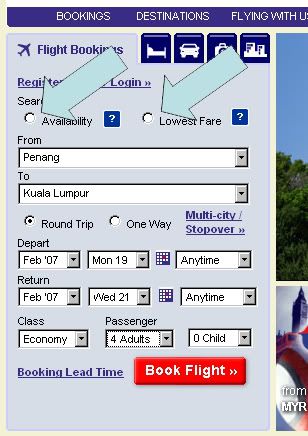
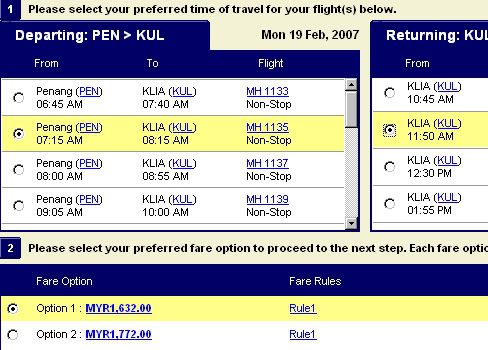
I went to their website, hoping to see some good deals on flights to KL during CNY. However I came back confused. Look at the pictures.
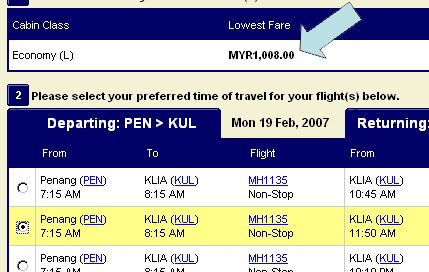
They offer 2 choices Availability or Low Fares. Of coz, one will choose low fares but only for adult. Anyway, I selected 4 adults. The cost came up to RM1K.
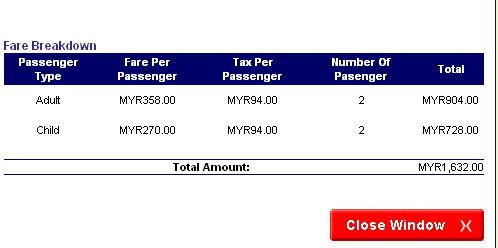
To do a comparison, I chose Availability, selecting the same route, same dates and the same time for 2 adult and 2 children. The cost came up to RM1.6K. Now figure it out, 4 adults are cheaper than 2 adult and 2 children. :sc:
Tell me how am I to book the flights? Choose 2 low fares and 2 availability fare for children? Or choose 4 low adult fares, can children be treated as adult? I think I will drive down. :snooty:
Availability Vs Low Fares:
Low Fares:
Availability Fares:
BreakDown Fares:
-
WP New Plugin – My Archives
When my children are sound asleep, what do I do? Lately I have been watching a whole lot of TV or Internet surfing. Today I came across a very useful plug-in for my blog. The plug-in is called “Clean Archives”. Source: http://www.sporadicnonsense.com/archives/.
Basically what it does is create a page showing the table of contents of my entire blog. Pretty cool. Tada, here is it: http://mybabybay.com/blog/?page_id=363. It is also in my sidebar under Pages called My Archives.
It works for those bloggers who are using WP and have their own host. Sorry, not sure whether it can work for those hosting in blogspot or wordpress.
Ok, enough of computer nonsense, back to bed..zzzZZZ


More info
myHotel Review
- Malaysia:
- Hard Rock Hotel Penang
- Penang Golden Sands
- Genting Resort World Malaysia
- Berjaya Langkawi Resort
- Singapore:
- Grand Hyatt Hotel In Singapore
- Singapore Royal Plaza
- Hong Kong
- Hong Kong Hollywood Disneyland Hotel
- US:
- Hyatt Summerfield Hotel in Colorado Springs
- Hotel Carlton San Francisco
- Santa Rosa Hilton Hotel
- Hyatt Vineyard Creek Hotel & Spa Santa Rosa
recent
- Penang Bon Odori 2014
- Garden Shopping
- Health Tips
- Maker vs Marker
- 10 More Life Hacks
- Benefits of Cucumber
- Chinese New Year 2014 Dishes
- Loom
- Curry Leaves
- Of First Fruit & Flower
Archives
- July 2014 (1)
- June 2014 (1)
- April 2014 (1)
- March 2014 (2)
- February 2014 (2)
- January 2014 (3)
- December 2013 (1)
- November 2013 (2)
- October 2013 (2)
- September 2013 (1)
- August 2013 (2)
- July 2013 (5)
- June 2013 (4)
- May 2013 (10)
- April 2013 (1)
- March 2013 (5)
- February 2013 (3)
- January 2013 (4)
- December 2012 (3)
- November 2012 (3)
- October 2012 (6)
- September 2012 (4)
- August 2012 (3)
- July 2012 (6)
- June 2012 (2)
- May 2012 (3)
- April 2012 (3)
- March 2012 (1)
- February 2012 (2)
- January 2012 (2)
- December 2011 (4)
- October 2011 (4)
- September 2011 (7)
- August 2011 (2)
- July 2011 (1)
- June 2011 (3)
- May 2011 (1)
- April 2011 (1)
- March 2011 (3)
- February 2011 (4)
- January 2011 (1)
- December 2010 (2)
- November 2010 (2)
- October 2010 (7)
- September 2010 (5)
- August 2010 (8)
- July 2010 (3)
- June 2010 (5)
- May 2010 (7)
- April 2010 (9)
- March 2010 (10)
- February 2010 (5)
- January 2010 (6)
- December 2009 (6)
- November 2009 (6)
- October 2009 (6)
- September 2009 (7)
- August 2009 (11)
- July 2009 (8)
- June 2009 (7)
- May 2009 (9)
- April 2009 (7)
- March 2009 (8)
- February 2009 (9)
- January 2009 (6)
- December 2008 (11)
- November 2008 (7)
- October 2008 (9)
- September 2008 (10)
- August 2008 (11)
- July 2008 (11)
- June 2008 (10)
- May 2008 (14)
- April 2008 (16)
- March 2008 (13)
- February 2008 (11)
- January 2008 (10)
- December 2007 (6)
- November 2007 (21)
- October 2007 (11)
- September 2007 (10)
- August 2007 (14)
- July 2007 (3)
- June 2007 (3)
- May 2007 (3)
- April 2007 (6)
- March 2007 (10)
- February 2007 (4)
- January 2007 (11)
- December 2006 (4)
- November 2006 (5)
- October 2006 (7)
- September 2006 (5)
- August 2006 (1)
- July 2006 (1)
- June 2006 (6)
- May 2006 (3)
- April 2006 (6)
- March 2006 (5)
- February 2006 (1)
- January 2006 (3)
- December 2005 (2)
- November 2005 (5)
- October 2005 (7)
- September 2005 (12)
- August 2005 (4)
- July 2005 (2)
- June 2005 (2)
- May 2005 (1)
- April 2005 (4)
Categories
- Advertlets
- Auction
- Award
- Baby
- Balloon
- Blogs
- Book
- Breastfeeding
- Business
- Car
- Charity
- Children
- Christianity
- Coach
- Collection
- Craft
- CStory
- Deco
- Design
- Dream
- Driving
- Economy
- English
- Entertainment
- Environment
- EPF
- Event
- Experience
- Finances
- Food
- Friends
- Furniture
- Game
- Garden
- Garden Tips
- Gift
- Greed
- Handphone
- Hangbag
- Health
- Hobby
- Hotel
- Household Tips
- Humor
- Information
- Insurance
- Internet
- Investment
- iPhone
- IT
- Kuala Lumpur
- Langkawi
- LB
- Living
- Malaysia
- Management
- Movie
- Music
- Myself
- Nature
- News
- Parenting
- Penang
- Photobook
- Playground
- PR
- ProductReview
- Rant
- RealityShow
- Recall
- Rental
- Reward
- Scam
- School
- Science
- Search Engine
- Service
- Shares
- Shopping
- Singapore
- Skill
- Special Day Event
- Stamps
- Sushi
- Tag
- Tax
- Technology
- Theme Park
- Tips
- Toys
- Travel
- Uncategorized
- US
- Video
- Vitamins
- Web Host
- Will
- Work
feeds

Copyright
Copyright © 2007 by Parkbay. All rights reserved.